Modern applications are complex. Fewer and fewer applications are built as single monolith that runs in one process, stores its data in a single database, and has access to the underlying single file system. Developers have had to design for web scale that requires the application and data to be stored not only logically separated, but also physically separated. And with the rise of Microservices architecture, APIs and features are also distributed and running in their own isolated environments. And many times these services need orchestration which requires even more custom code.
But what if there was a better way to manage and execute these flows? A way that was cloud and vendor agnostic? A way that provided a scalable platform that allowed developers to orchestrate system components with plugins, a means to design and execute these workflows, and a control plan for oversight and management?
This is exactly what Kestra was designed to do! And what they are currently working on in public.
As a developer, I’m going to demonstrate an example of just how to do that with AWS, Lambda, DynamoDB, and Kestra.
Disclosure
But before we begin and for disclosure, Kestra sponsored me to experiment with their product and report my findings. They have rented my attention, but not my opinion. Here is my unbiased view of my experience as a developer when building an API workflow in AWS that is orchestrated with Kestra to bring together HTTP requests with Lambda and DynamoDB.
Solution Overview
Orchestration can not only be difficult to build, it can be difficult to manage and visualize. Kestra solves this problem out of the box by providing a Workflow Topology. Each flow that is built will come with a diagram showing the execution path. The below is the workflow that I’m going to demonstrate through the balance of this article.
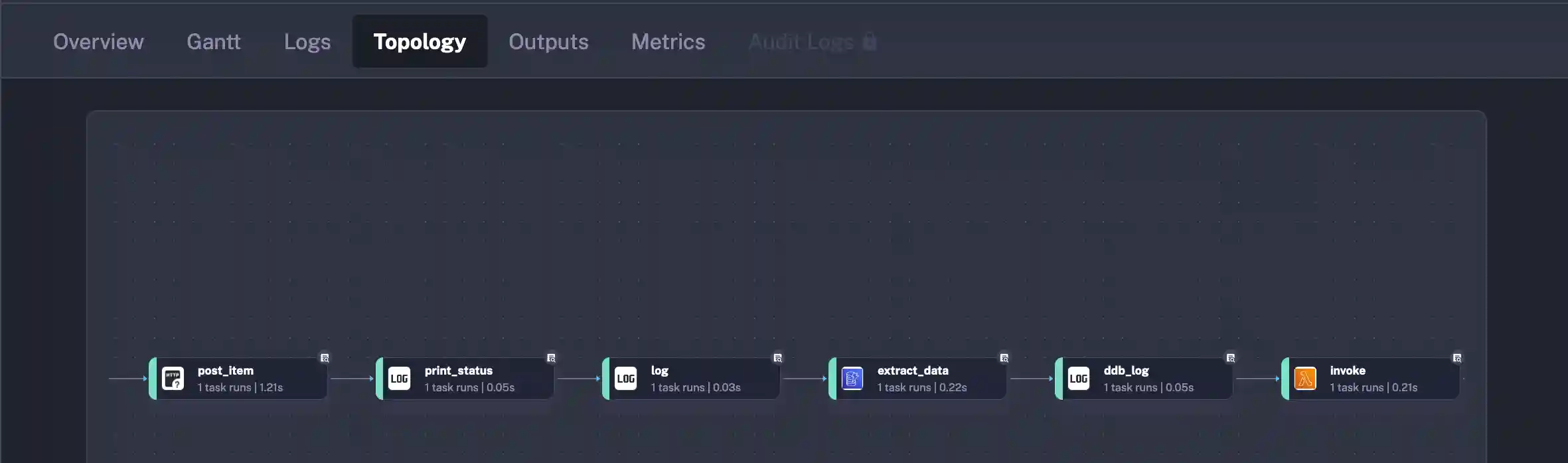
The workflow reads out like this:
- POST a payload to an AWS Lambda Function fronted by a FunctionURL
- Print out the return payload formatted with
jq - Use the
idsupplied in the POST response body to query DynamoDB - Invoke a Lambda Function with the payload from the DynamoDB Query
- The Lambda will update a timestamp
- Print the final data structure highlighting the changed timestamp field
I will be highlighting code throughout, but at the end of the article, I’ll have a Github Repository that you can clone and get going.
Solution Components
There are several discrete components to Kestra, but for the balance of this article, I’ll be working through a Flow and its Executions. A Flow can be thought of as a representation of a business or application process. Just as the above, there are 5 “steps” that must happen for a successful execution. Kestra manages that workflow on my behalf. My job is to define what those steps are using YAML to build out the operation that I’m looking to perform.
Each operation in Kestra is defined as a Task. That Task will provide me options for configuration that is exposed through YAML fields.
POST Operation
To have a complete and working example, I’ve built a Lambda Function that is hosted behind a FunctionURL for execution in this Task. Without spending too much time on the build, I do want to show the payload that is expected. My POST will take a name and description and return back the id that was generated before saving in DynamoDB.
use serde::{Deserialize, Serialize};

#[derive(Serialize, Deserialize, Debug)]
#[serde(rename_all = "camelCase")]
pub struct ReadModel {
    pub id: String,
}

#[derive(Serialize, Deserialize, Debug)]
#[serde(rename_all = "camelCase")]
pub struct WriteModel {
    pub name: String,
    pub description: String,
}
With the Lambda Function in place, I can construct my Kestra HTTP Request via the below YAML. I’ve defined a constant payload in the inputs section and then the first task I am creating is post_item
Every Kestra Task will have a type and then the properties required or optional to complete the operation. For this HTTP Request, I’m supplying a uri, method, content-type and a body.
inputs:
  - id: payload
    type: JSON
    defaults: |
      {
        "name": "One",
        "description": "Description"
      }
tasks:
  - id: post_item
    type: "io.kestra.plugin.core.http.Request"
    uri: <URL>
    method: POST
    contentType: application/json
    body: "{{ inputs.payload }}"
Query DynamoDB
As of this writing, there are over 550 plugins available through the Kestra ecosystem. The amazing part is the variety. There are plugins for popular opensource projects hosted under Apache, popular file formats like CSV and Parquet, and plugins for all of the popular cloud providers.
I reached for one of my favorites in DynamoDB to see how well flushed out the support for that database was. Being that all of the DynamoDB operations can be performed over HTTP and with the AWS SDK, it seemed like a safe choice.
DynamoDB supports a few fetch operations in Scan, Query, and GetItem. Each of these have different requirements and use cases. I was happy to see that my preferred GetItem was supported out of the box so that I could fetch just the one item by the id key supplied from my HTTP POST request in task 1.
Below is the Kestra Task for fetching data from DynamoDB. Notice again that the type is present and then there are various fields required to satisfy the plugin. Looking at the key field, there’s a call out to {{ }} and jq. Kestra uses the Pebble Template Engine for working with values in dynamic fields. This post couldn’t possibly do it justice, but it’s a robust vehicle for working with variables and outputs between tasks in a flow.
- id: extract_data
  type: io.kestra.plugin.aws.dynamodb.GetItem
  tableName: ArticleTable
  # fetchType: FETCH
  accessKeyId: <ACCESS KEY ID>
  secretKeyId: <SECRET KEY ID>
  region: us-west-2
  key:
    id: "{{ outputs.post_item.body | jq('.id') | first }}"
Invoking a Lambda
As the last piece of the workflow, I’m going to mutate the data and update the timestamp value in the original payload. To accomplish this, I could do it inside of Pebble since this is a simple example. But I wanted to give the Lambda integration a try.
At this point, you should expect the common task format that includes a type and some configuration properties to fill out the operation. AWS Lambda provides a direct invoke API endpoint that includes the ability to supply a payload. I’m sending all of the DynamoDB record to my Lambda in order to perform my updatedTimestamp update.
- id: invoke
  type: io.kestra.plugin.aws.lambda.Invoke
  accessKeyId: <ACCESS KEY ID>
  secretKeyId: <SECRET KEY KD>
  region: us-west-2
  functionArn: "<FUNCTION ARN>"
  functionPayload:
    id: "{{ outputs.extract_data.row.id }}"
    name: "{{ outputs.extract_data.row.name }}"
    description: "{{ outputs.extract_data.row.description }}"
    createdTimestamp: "{{ outputs.extract_data.row.created_at }}"
    updatedTimestamp: "{{ outputs.extract_data.row.updated_at }}"
Code to update the timestamp.
/// Main function handler.  This is executed when a Kestra invokes my Lambda
async fn function_handler(mut event: LambdaEvent<ReadModel>) -> Result<ReadModel, Error> {
    // update timestamp with NOW
    event.payload.updated_timestamp = chrono::Utc::now();
    Ok(event.payload)
}
To validate the success of my workflow, here are two log statements I’m emitting. Notice that the record is the same, but the updatedTimestamp has been mutated.
{
  "id": "2pH2X871xkhAbcMZ6Tsnoo18oxN",
  "name": "One",
  "createdTimestamp": "2024-11-24 00:38:36.833892903 UTC",
  "description": "Description",
  "updatedTimestamp": "2024-11-24 00:38:36.833892903 UTC" // <--- Timestamp
}
{
"id": "2pH2X871xkhAbcMZ6Tsnoo18oxN",
"name": "One",
"description": "Description",
"createdTimestamp": "2024-11-24T00:38:36.833892903Z",
"updatedTimestamp": "2024-11-24T00:38:37.749102734Z" // <--- Timestamp Updated
}And that’s it! I’ve accomplished what I set out to in the Solution Overview with some YAML and functionality hosted in AWS.
Kestra Control Plane
As a developer I usually measure new capabilities by how well they serve my needs and then how easy will they be to support and extend. From my experience with Kestra, it puts a big checkmark in both of these boxes.
I found that starting off, the installation was a snap. First off, there is a complete guide that supports a variety of deployment scenarios. As a developer, it was easy to setup locally via Docker. And if I was running it in production, I’ve got options for bare metal virtual machines all the way through running on Elastic Kubernetes Service in AWS. The ability to host in EKS gives me great comfort that scaling up as my workflow demands increase shouldn’t be an issue.
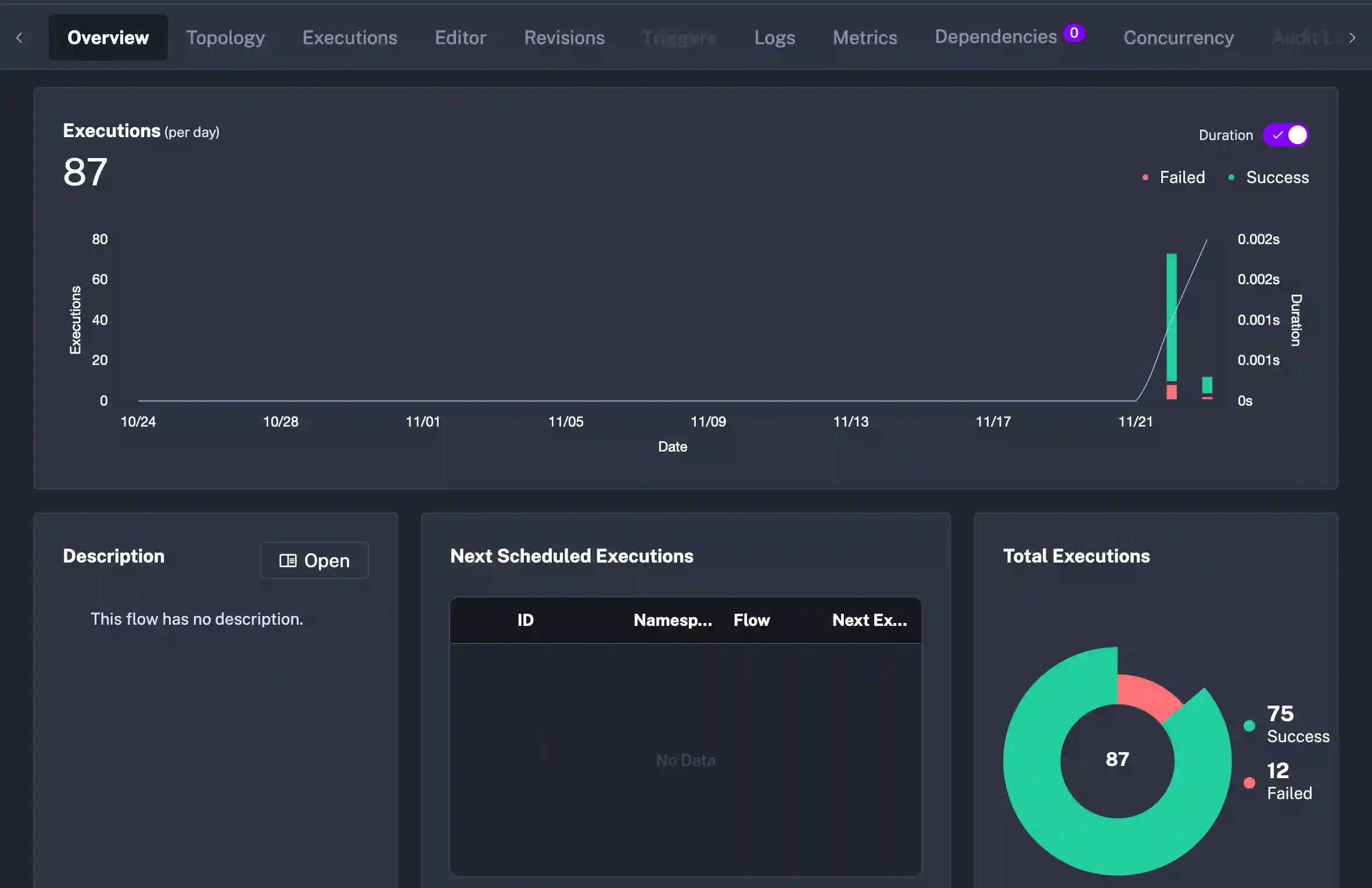
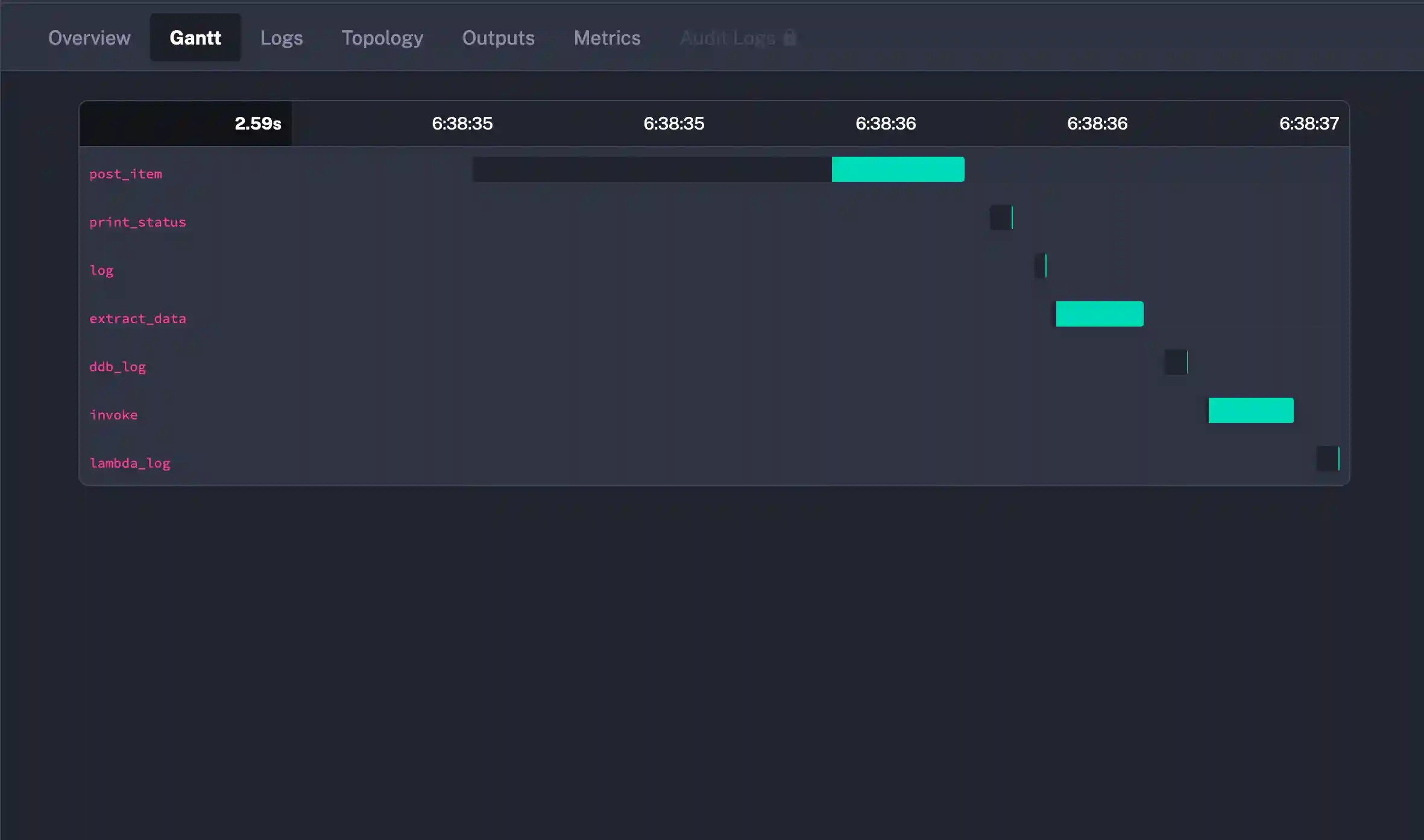
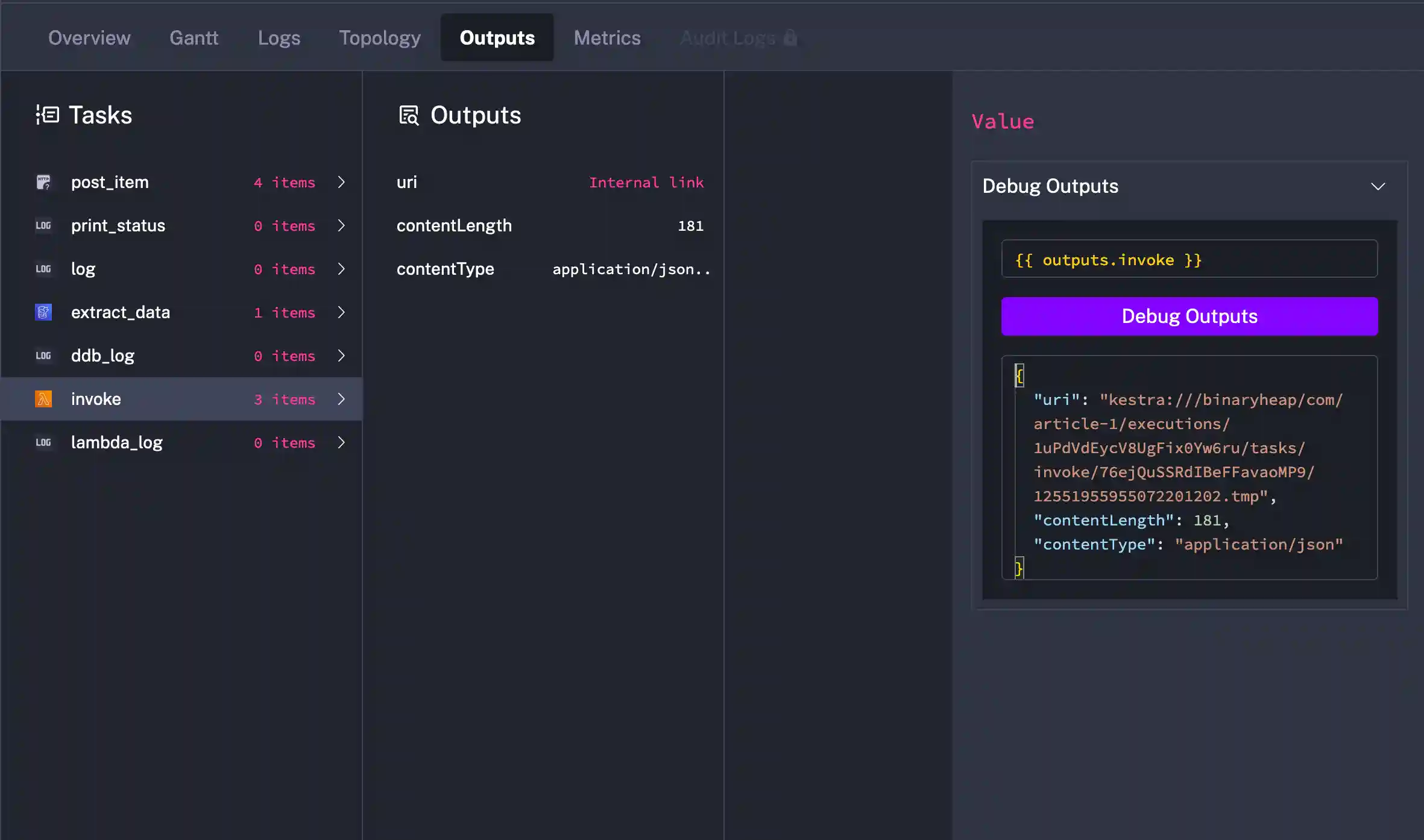
My next concern for management of metrics, executions, logs, flow definitions is easily satisfied through the Kestra UI.
Metrics
Executions
Logs
Editor
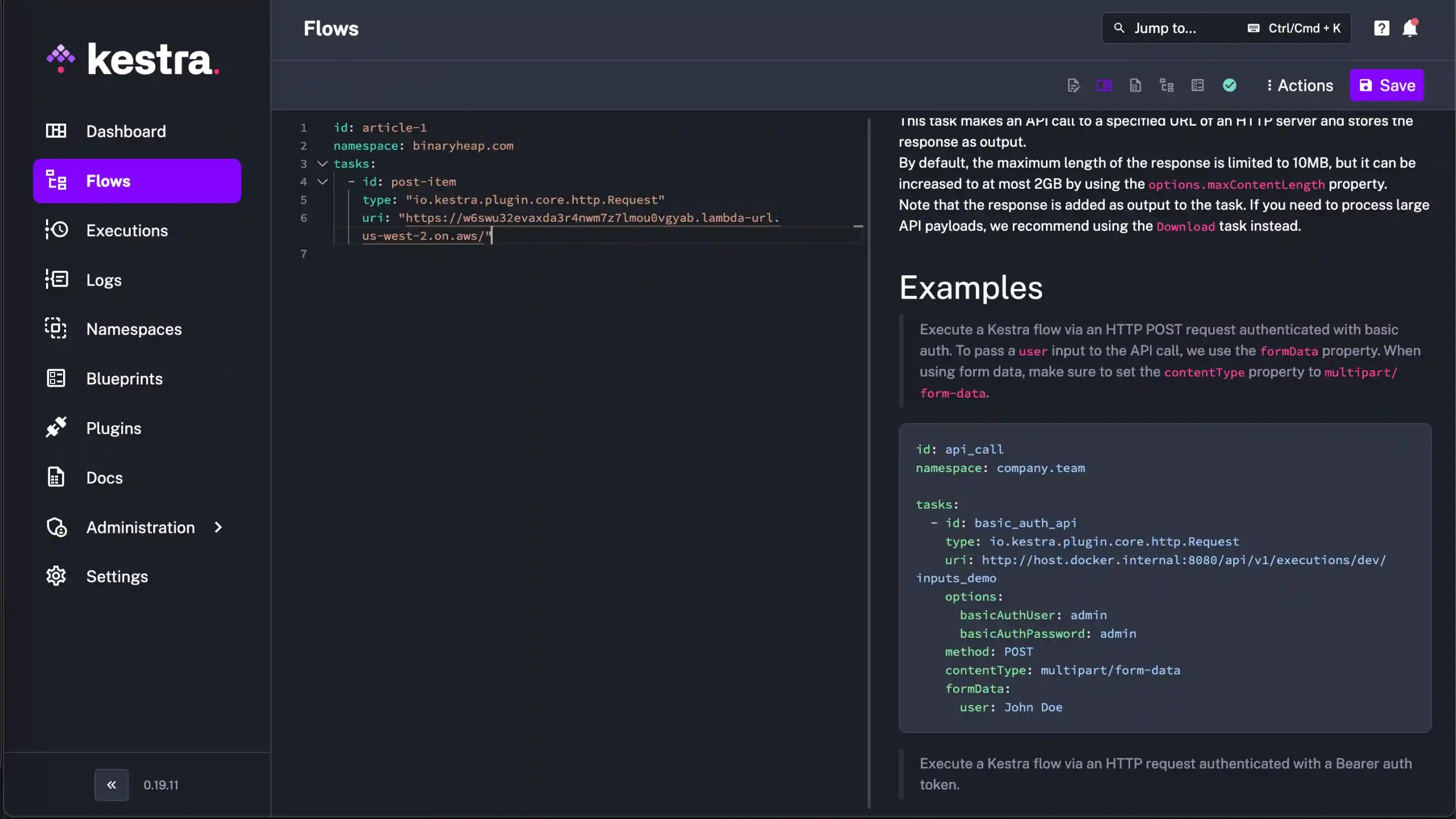
My opinion on the Control Plane is that it’s a first class citizen. Sometimes I work with tools that have amazing functionality, but lack the polish and thought in the management control plane. This is not the case with Kestra as they’ve paired robust features with a mature interface for working with the individual components of the platform.
Final Thoughts
As I touched upon in the beginning of this article, modern software is more complex than its predecessors. APIs and data are distributed amongst teams. Distributed transactions and workflow management is often custom built but then requires more code to maintain and operate at scale. Kestra steps in to take some of that heavy lifting off of the developer’s shoulders so that they can focus on building solutions and not running this type of orchestration.
I’ve grouped my opinions into two categories that I want to walk through.
The Good
Kestra makes things easy to get started right out of the gate. The install locally is just Docker and the more advanced installs don’t look complicated as well. There are plugins for Git so that flows could be fetched locally from a repository and when hosted, they are stored in a central database for ease of collaboration.
The plugin support this early on is very impressive. What I like the most is the variety. Many times, orchestrators focus on a niche, but Kestra has file support, database support, cloud plugins, and then a variety of timers and triggers. Running Cron type jobs in the cloud always feels a little clunky because the management of the schedule never gets the attention it requires. Kestra doesn’t do that. It also exposes “next runs” and builds upon the well known Cron format.
Documentation is amazing. Every plugin I looked at had solid coverage. Properties were declared and shown as required or optional and had descriptions about what their purpose was. I also found the Blue Prints section to be helpful. More on that in the Looking Forward To section below. But for something as robust and as polished as it is, to have solid documentation this early is no small feat.
Lastly, the Editor is really nice. It took me a bit to get oriented around using a web-based editor as I’m a Neovim user and love my terminal. But as I got going, I found the documentation, type/syntax checking, and integration with the rest of the platform to be very solid. I do need to explore if I could work on the flows in Neovim and have them upload with changes. Makes we want to explore of there is a Language Server Protocol that Kestra is using for the web, that could be leveraged in the terminal. But that’s for another day.
Looking Forward To
I don’t want to call this section “The Bad” because there truly wasn’t anything bad about working with Kestra. I just believe that these are things that’ll continue to evolve as the platform matures. This also might be on me and I need to spend more time on the platform.
I mentioned above about the editor, I didn’t get a chance to test through working in my preferred Neovim for building flows. I know there is some traction with the VSCode plugin, and it integrates with the Redhat YAML LSP, so I think this one falls more on me than on Kestra. But it requires more exploration.
As much as I love the variety in the plugins, as an AWS developers, the Trigger support to kick off workflows in AWS is still a little sparse. There is good support for scheduled and real-time SQS and S3 triggers which is a great first start. But I would need Kinesis, DynamoDB Streams, EventBridge, and perhaps CloudTrail as triggers to really move into my sweet spot. I also would like to see more advanced Blue Prints showing up. Simple 2 and 3 Task examples are great, but more full featured use case exploration would be amazing. Sometimes the nuance of different properties gets glossed over but there are nuggets of wisdom that can accelerate a developer’s understanding.
The last piece that I think I need a better handle on is debugging. My main challenge with orchestration engines is how to develop and troubleshoot when things go wrong locally and in production. Kestra provides nice task steps that can emit logs as well as provisions in the control plane UI for displaying executions. One thing that would really push it over the top would be to have a step-through debugger that allows for changing of fields and values from step to step. As a Rust programmer, types and debugging are first class citizens. And while I know this is a hard thing to solve in an orchestration platform, it would really set the tool apart from others.
Wrapping Up
I hope that you enjoyed this walk through and picked up some ideas about how you can integrate Kestra into your next feature build. I walked away super impressed with what I got my hands on and will be exploring the platform more in the future.
If I was looking to integrate Kestra into my workflow, I’d probably start first with data transformation and building pipelines. The visual metrics, executions, and logs from the control plane UI would give me comfort knowing that I could manage these key aspects as my needs scaled. I also believe that I could enable new workflows by leveraging SQL Triggers that poll tables and can start complex workflows in spaces where change data capture has been elusive.
I encourage you to check out their website to get started and if you need a sample to kick you off, here is that Github Repository.
Thanks for reading and happy building!