A modern web application can take many shapes and forms from an architecture and design standpoint. With the launch of AWS Lambda in 2014, the cloud vendor thrust the capabilities of Serverless into a builder’s choice of tools. New design patterns were born and we entered the age of Event-Driven Architecture (EDA). Now I’m not saying that Serverless invented EDA, but what I am saying is that choosing to build a Serverless system will force you into the world of EDA. By nature, Lambda Functions are triggered by events. Let’s take this to a web API. A builder needs to handle ingress, compute, and data storage. But what happens with databases that don’t support something fundamental like searching?
Enter Typesense. And more specifically, Typesense’s Cloud offering. For the balance of this article, I’m going to show you how to build a Serverless API offering that uses the power of Lambda and DynamoDB paired with the ease and flexibility of Typesense to deliver a robust API solution.
But before we begin and for disclosure, Typesense sponsored me to experiment with their product and report my findings. They have rented my attention, but not my opinion. Here is my unbiased view of my experience as a developer when integrating search into a Serverless Web API with AWS.
Architecture of the Solution
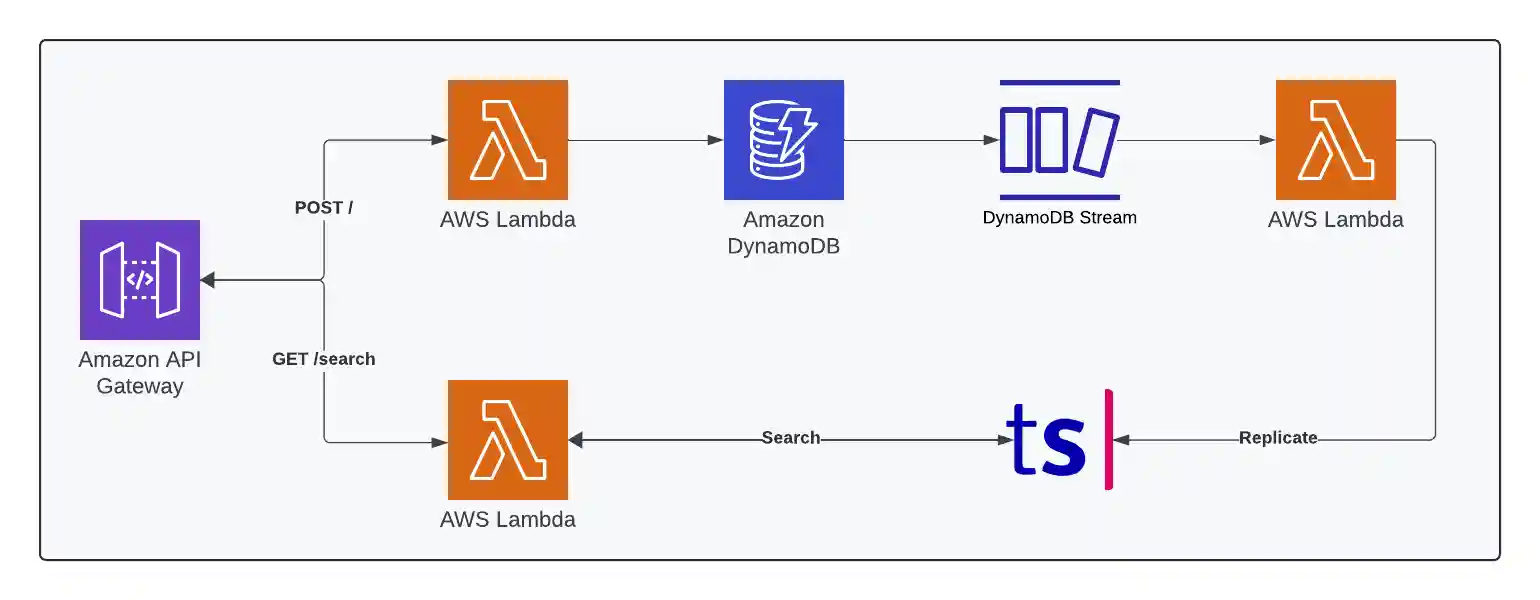
Buckle up, as this article is going to dive into building a working solution that handles the following scenarios:
- Constructing an API Gateway in AWS
- Deploying 3 Lambda Functions
- Handles
POST / - Handles
GET /search - Responds to a DynamoDB stream to populate the Typesense Cloud collection
- Handles
- Builds a DynamoDB table to hold the Recipe entity
- Replicates data to Typesense as it changes in DynamoDB
- Provides an API with a Postman Collection
And, if you are looking to follow along, here is the GitHub repository that you can clone and work with locally.
One last thing before jumping into code, the below image accurately captures the bullet points above. Sometimes, a picture tells the story than words.
Let’s get going!
Working Solution
I tend to like working backwards to forwards and often chopping through parts that are newer to me so I can unblock myself to speed through the things I’m more comfortable with. This is my first run through the Typesense Cloud offering so it makes sense to run through the bits needed before I get to the API and the Lambdas.
Typesense Cloud
I’ve become so biased towards managed services in so many ways recently, that when I started exploring Typesense for this piece, I was ecstatic to discover Typesense Cloud. When working through the build, I needed a Collection to organize my documents. But before I can build a collection, I need to create an account.
Account Creation
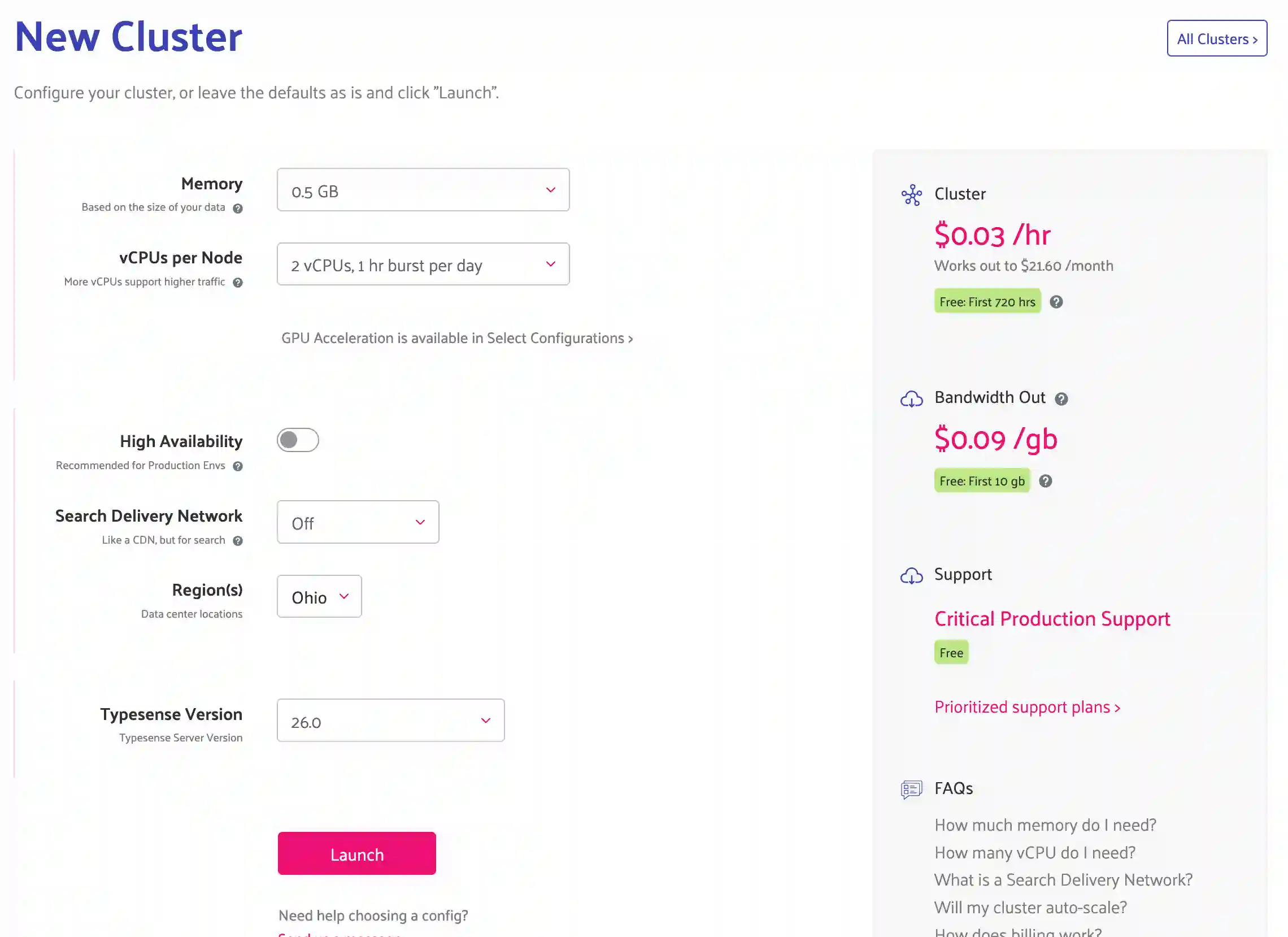
Setting up an account is straightforward. Pick the preferred location, how many nodes, and if you want an SDN. What’s an SDN? Typesense describes it as a Search Delivery Network. I need to investigate more, but for now, I’ve left it unchecked. There are solid documentation articles supporting each of the choices in that screen so if you are looking at Typsense for production workloads, it’ll make sense to explore those in the FAQ and help.
If you are following along, give this a few minutes and you’ll have a fresh account created and will be ready for the next step which is to create an API key. That key plus your cluster’s URL will be how the SDK later on in the article is initialized.
API Key
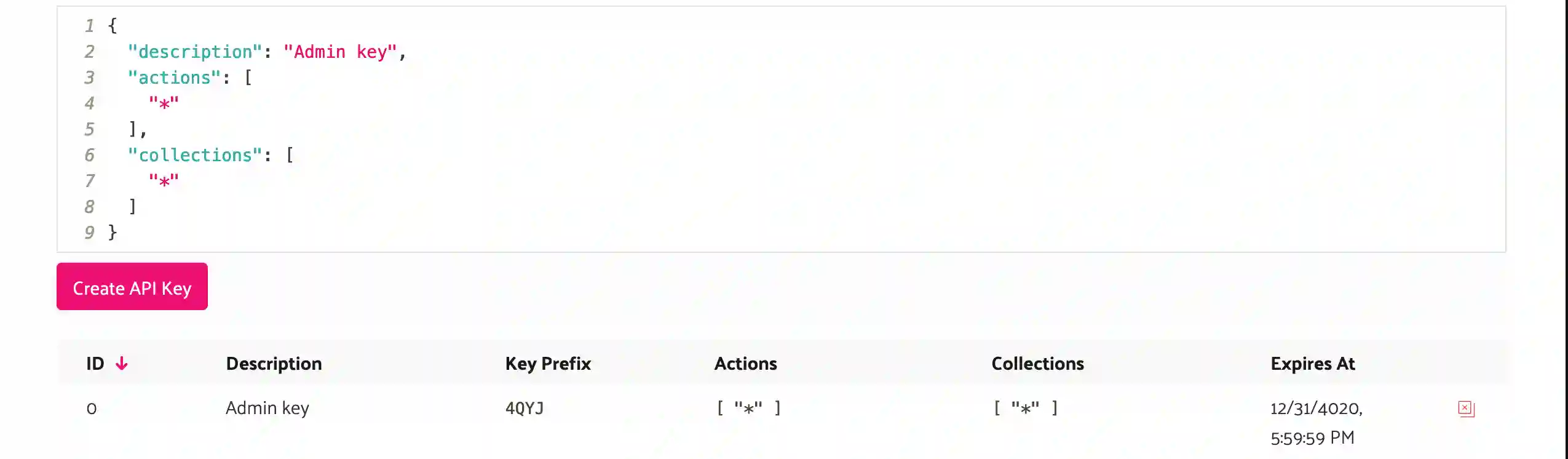
An API key in the Typesense Cloud is just like what you’d expect. It’s a series of unique characters that identifies your requests when paired with that cluster URL. Keys can have actions they are limited to. Additionally can be scoped to specific collections. For my key, I’m going with good ole * for both which I wouldn’t recommend for production workloads.
Collection Creation
And lastly, I need to establish a Collection to store my documents. What I’m building below is a Recipe API that’ll support the creation and searching of Recipes. So naturally, the collection is called recipes.
One thing to pay attention to is the way the collection is defined. There are options for fields, datatypes, default sorts, and other options. The Typesense documentation is fantastic so I’ll point you at this article if you are interested in exploring more about Collection management.
Below is a list page in my account showing the collections I have running and the document count at the time when the page loads.
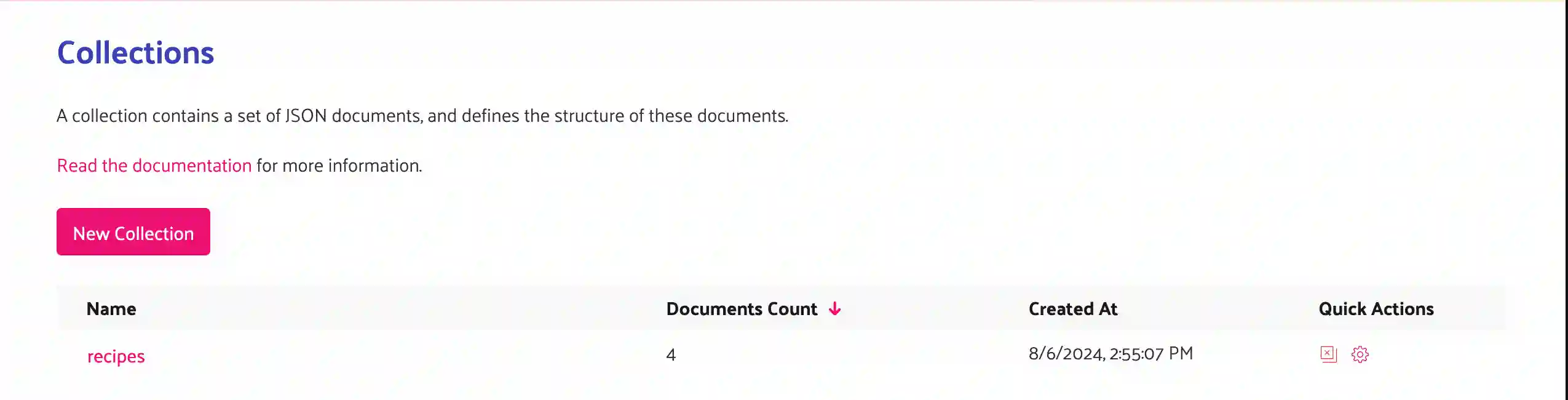
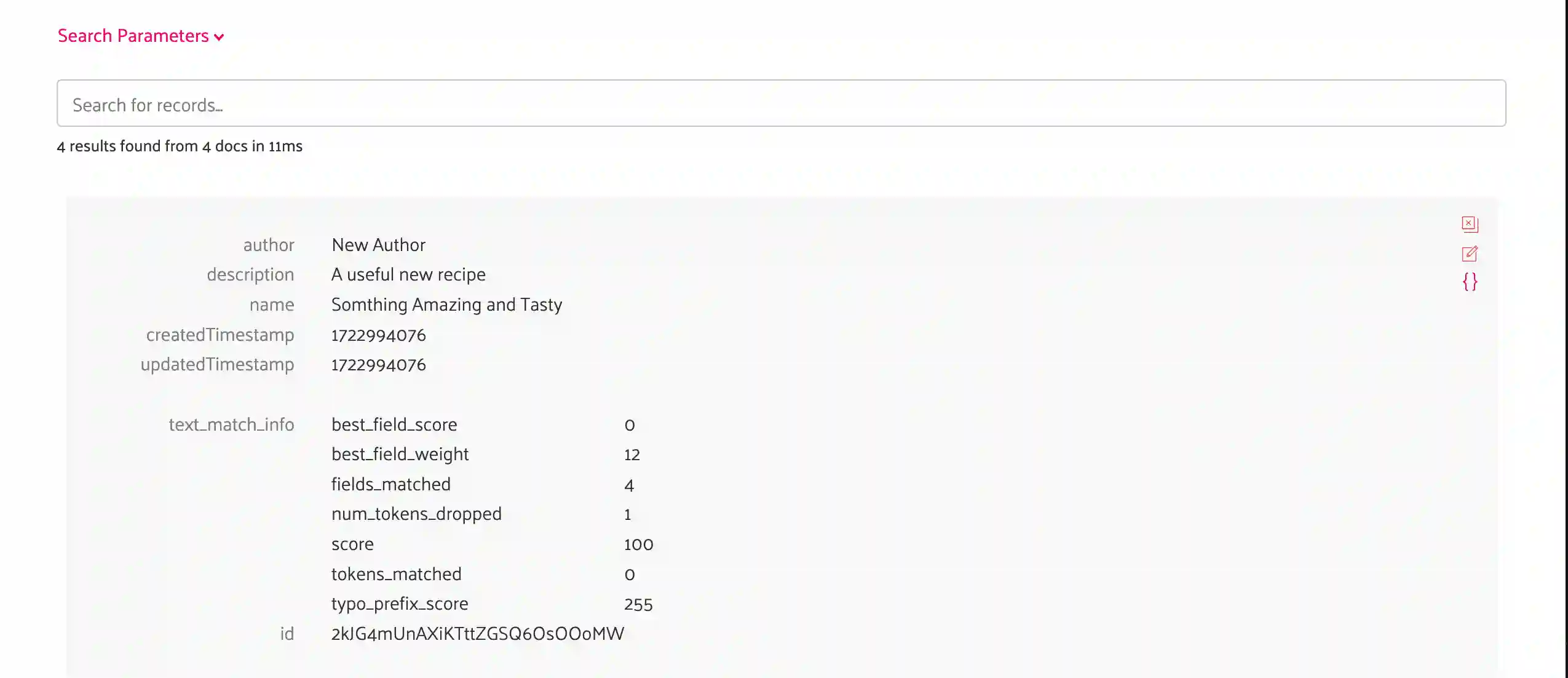
And once drilling further into the collection, this page shows the structure and datatypes for actual documents that are stored in this collection. The UI is extremely robust and works great for testing queries and looking at documents.
AWS Lambda Functions
The solution I’m building below comes included with AWS CDK code written in TypeScript for handling the provisioning of the infrastructure needed to run the solution. I’ll spend a little bit of time on the CDK pieces and the Lambda Function bits that initialize SDKs. But I’m going to focus on exploring the Typesense-specific pieces to achieve the replication I showed in the architecture diagram.
Throughout the Golang code, I’m going to be using this repository which is a community-supported Typesense SDK for Golang. My impressions are that it’s solid code and something I’d be comfortable building a production system with.
Replication via Change Data Capture
The POST / Lambda Function handler is responsible for writing the recipe into DynamodDB. To achieve replication into Typesense so that the DynamoDB item is available as a Typesense document, I’m going to leverage DynamoDB’s Streams.
Lambda and DynamoDB Stream Connection
Setting that up in CDK is step one and the parts of this snippet that I want to highlight are:
- The environment variables
- TYPESENSE_CLUSTER_URL: is the cluster URL from my Typesense Cloud Account
- TYPESENSE_API_KEY: is the key I created like in the above section
- Granting access and specifying the Stream as a trigger for my Lambda Function
export default class CdcFunctionConstruct extends Construct {
  constructor(scope: Construct, id: string, table: Table) {
    super(scope, id);

    const func = new GoFunction(scope, "CdcFunction", {
      entry: path.join(__dirname, `../../../src/cdc-function`),
      functionName: "typesense-demo-cdc-function",
      timeout: Duration.seconds(30),
      environment: {
        TYPESENSE_CLUSTER_URL: process.env.TYPESENSE_CLUSTER_URL!,
        TYPESENSE_API_KEY: process.env.TYPESENSE_API_KEY!,
        LOG_LEVEL: "debug",
        TABLE_NAME: table.tableName,
      },
    });

    func.addEventSource(
      new DynamoEventSource(table, {
        startingPosition: StartingPosition.LATEST,
      })
    );
    table.grantStream(func);
  }
}
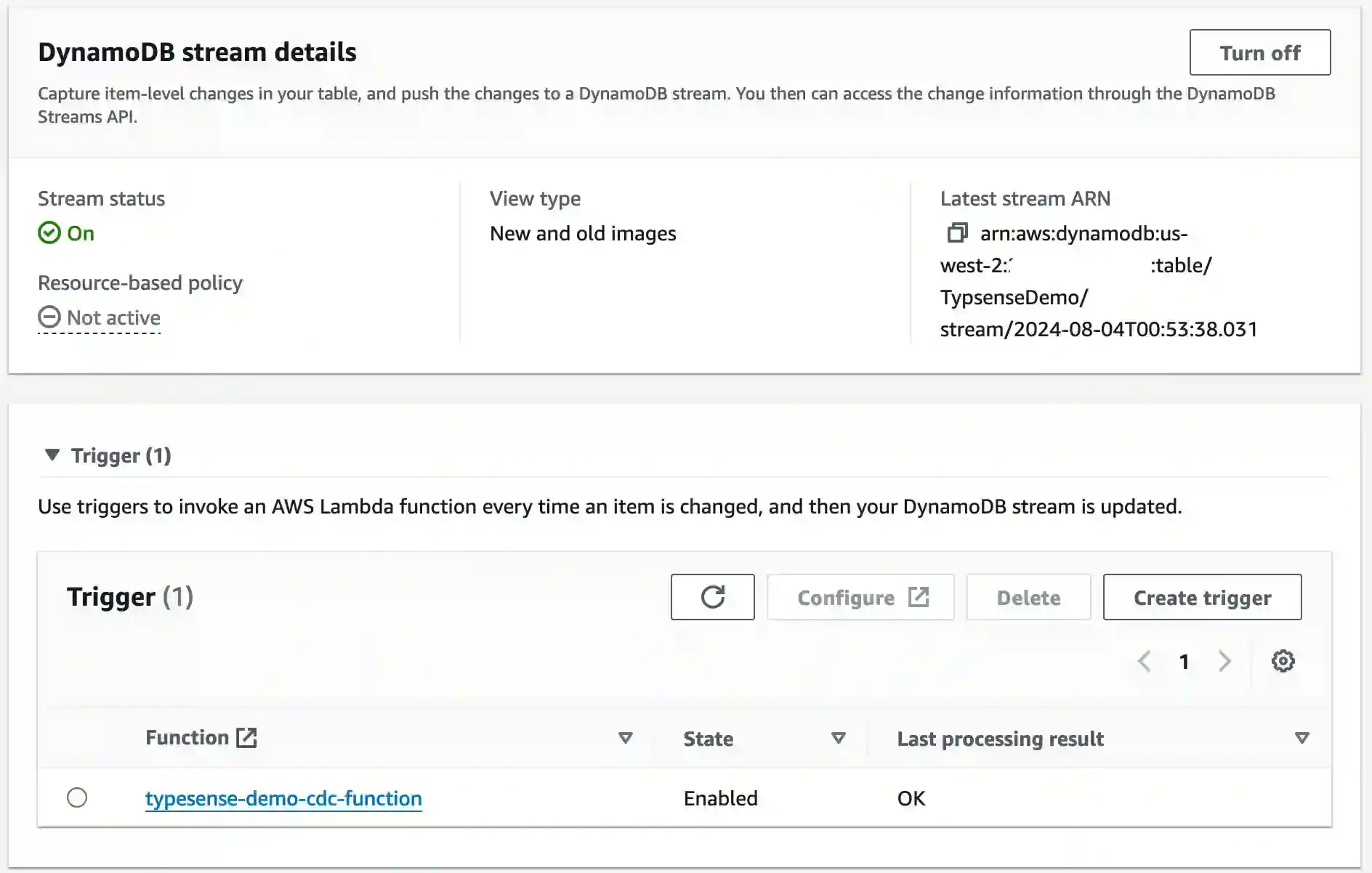
When deployed, DynamoDB will show this connection in the AWS Console.
Handling Change and Replicating to Typesense
With the connection made, it’s time to build the handler. But first, in the init function, I need to establish the Typesense client with the SDK I mentioned above. Once that is squared away, the handler function iterates over the records captured in the DynamoDBEvent and then prepares them into a Recipe struct. That struct is then modified into a struct that supports the Typesense document schema. And lastly, the document is uploaded.
func init() {
    logrus.SetFormatter(&logrus.JSONFormatter{})
    logrus.SetLevel(logrus.DebugLevel)
    url := os.Getenv("TYPESENSE_CLUSTER_URL")
    apiKey := os.Getenv("TYPESENSE_API_KEY")
    client = typesense.NewClient(
        typesense.WithServer(url),
        typesense.WithAPIKey(apiKey))
}

func handler(ctx context.Context, event events.DynamoDBEvent) (interface{}, error) {
    logrus.WithFields(logrus.Fields{
        "event": event,
    }).Info("The Event")

    for _, v := range event.Records {
        if v.EventName == "REMOVE" {
            continue
        }

        recipe := lib.NewRecipeFromStreamRecord(v)
        logrus.WithFields(logrus.Fields{
            "recipe": recipe,
        }).Info("Recipe made")

        typesenseRecipe := lib.NewRecipeTypesenseFromRecipe(recipe)
        _, err := client.Collection("recipes").Documents().Upsert(ctx, typesenseRecipe)
        if err != nil {
            logrus.Errorf("Error creating new Typesense document: %s", err)
        }
    }
    return nil, nil
}
The Typesense model looks exactly like the schema definition from the collection. Note that I’m providing attributes for how the JSON marshaller should render the document.
// RecipeTypesense represents the document model that will be persisted
// into the Typesense cluster
type RecipeTypesense struct {
    ID               string `json:"id"`
    Author           string `json:"author"`
    Name             string `json:"name"`
    Description      string `json:"description"`
    CreatedTimestamp int64  `json:"createdTimestamp"`
    UpdatedTimestamp int64  `json:"updatedTimestamp"`
}
And then my function to convert from one struct to another before sending it to the Typesense Cloud.
// NewRecipeTypesenseFromRecipe function for creating a RecipeTypesense
// from a Recipe
func NewRecipeTypesenseFromRecipe(recipe *Recipe) *RecipeTypesense {
    return &RecipeTypesense{
        ID:               recipe.ID,
        Author:           recipe.Author,
        Description:      recipe.Description,
        Name:             recipe.Name,
        CreatedTimestamp: recipe.CreatedTimestamp.Unix(),
        UpdatedTimestamp: recipe.UpdatedTimestamp.Unix(),
    }
}
And finally back to the code in main that uses the SDK to send into the collection.
_, err := client.Collection("recipes").Documents().Upsert(ctx, typesenseRecipe)Searching with the SDK
With documents now being replicated into Typesense asynchronously from changes happening in DynamoDB, it’s time to look at searching. For search, I’ve built that 3rd Lambda Function for communicating with the Typesense API.
The CDK code establishes the Lambda Function, attaches it to the /search path in API Gateway, and configures it to receive POST requests. It also sends the Lambda environment variables for the Typesense client.
export default class SearchFunctionConstruct extends Construct {
  constructor(scope: Construct, id: string, api: RestApi) {
    super(scope, id);

    const func = new GoFunction(scope, "SearchFunction", {
      entry: path.join(__dirname, `../../../src/search-function`),
      functionName: "typesense-demo-search-function",
      timeout: Duration.seconds(30),
      environment: {
        LOG_LEVEL: "debug",
        TYPESENSE_CLUSTER_URL: process.env.TYPESENSE_CLUSTER_URL!,
        TYPESENSE_API_KEY: process.env.TYPESENSE_API_KEY!,
      },
    });

    const resource = new Resource(scope, "SearchResource", {
      parent: api.root,
      pathPart: "search",
    });

    resource.addMethod(
      "GET",
      new LambdaIntegration(func, {
        proxy: true,
      })
    );
  }
}
Once I’m past this CDK code, I’m set to build the Lambda Function that’ll perform the search. I’m going to skip the client initializing in this example, but show that the handler responds to ApiGatewayProxyRequests and coordinates the search.
// handler runs with each API Gateway Request
func handler(ctx context.Context, request events.APIGatewayProxyRequest) (events.APIGatewayProxyResponse, error) {
    statusCode := 200

    query := ""

    // parse out the query string for the search or set it to ""
    if q, ok := request.QueryStringParameters["q"]; ok {
        query = q
    }

    // fetch all documents from Typesense
    r, err := lib.SearchDocuments(ctx, client, query)
    // if an error is returned from the search, log it and return 500
    if err != nil {
        logrus.Errorf("Error searching documents: %s", err)
        statusCode = 500
        return events.APIGatewayProxyResponse{
            StatusCode:        statusCode,
            Headers:           map[string]string{},
            MultiValueHeaders: map[string][]string{},
            Body:              "",
            IsBase64Encoded:   false,
        }, nil
    }

    // conver the documents to DTO structs, marshal them into a JSON string
    // and then return out to the client
    dtos := lib.NewRecipeViewsFromRecipes(r)
    v, _ := json.Marshal(dtos)
    return events.APIGatewayProxyResponse{
        StatusCode:        statusCode,
        Headers:           map[string]string{},
        MultiValueHeaders: map[string][]string{},
        Body:              string(v),
        IsBase64Encoded:   false,
    }, nil
}
Note the lib.SearchDocuments. That function is what performs the SDK calls against the Typesense API. With some investigation into that function, I’m building a Typesense query, supplying the required queryBy and then using createdTimestamp:desc as the search results sort order.
func SearchDocuments(ctx context.Context, client *typesense.Client, query string) ([]Recipe, error) {
    queryBy := "name"
    sortBy := "createdTimestamp:desc"
    searchParameters := &api.SearchCollectionParams{
        Q:       &query,
        QueryBy: &queryBy,
        SortBy:  &sortBy,
    }

    results, err := client.Collection("recipes").Documents().Search(ctx, searchParameters)
    if err != nil {
        return nil, err
    }

    recipes := []Recipe{}
    for _, v := range *results.Hits {
        logrus.Infof("Docs: %v", v.Document)
        r := NewRecipeFromTypesenseRecipe(*v.Document)

        recipes = append(recipes, *r)
    }

    return recipes, nil
}
With the results returned from the API, I’m able to then convert those Typesense documents into a []Recipe.
func NewRecipeFromTypesenseRecipe(m map[string]interface{}) *Recipe {
    r := &Recipe{}

    for k, v := range m {
        if k == "description" {
            r.Description = v.(string)
        } else if k == "name" {
            r.Name = v.(string)
        } else if k == "author" {
            r.Author = v.(string)
        } else if k == "createdTimestamp" {
            t := v.(float64)
            r.CreatedTimestamp = time.Unix(int64(t), 0)
        } else if k == "updatedTimestamp" {
            t := v.(float64)
            r.UpdatedTimestamp = time.Unix(int64(t), 0)
        } else if k == "id" {
            r.ID = v.(string)
        }
    }

    r.PK = fmt.Sprintf("RECIPE#%s", r.ID)
    r.SK = fmt.Sprintf("RECIPE#%s", r.ID)
    return r
}
Let’s have a look at putting it all together!
Putting it Together
With the pieces in place, let’s run some API calls and see what they produce.
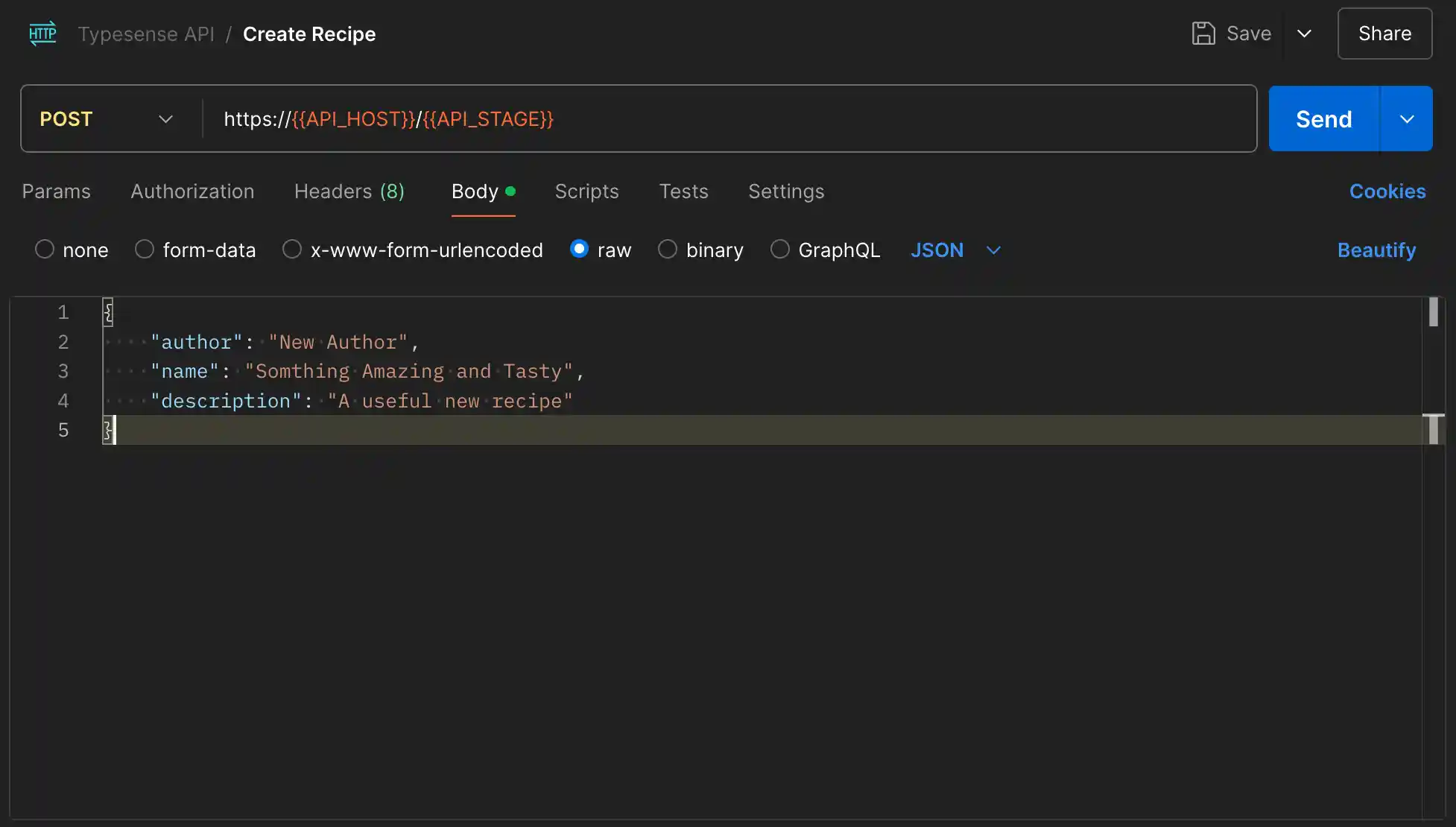
The first endpoint is the POST / which will create a recipe. Feel free to play around with the values, but for a sample, here’s the JSON I’m going to submit.
{
  "author": "New Author",
  "name": "Somthing Amazing and Tasty",
  "description": "A useful new recipe"
}
Inside the GitHub repository, there is a Postman collection that will have the payloads, paths, and there is an environment file that can be used to fill in the values for HOST and STAGE.
Once that runs through the AWS API Gateway, down to the Lambda Function, stored in DynamoDB, and then replicated to Typesense via the change data capture Lambda Function, I can execute the search. And by the way, all of those discrete pieces take less than a second to execute. And once the 2 Lambda cold starts are cleared, it happens even faster.
The search is a GET /search request and takes a ?q= query string parameter that gets used to filter the name field on the document.
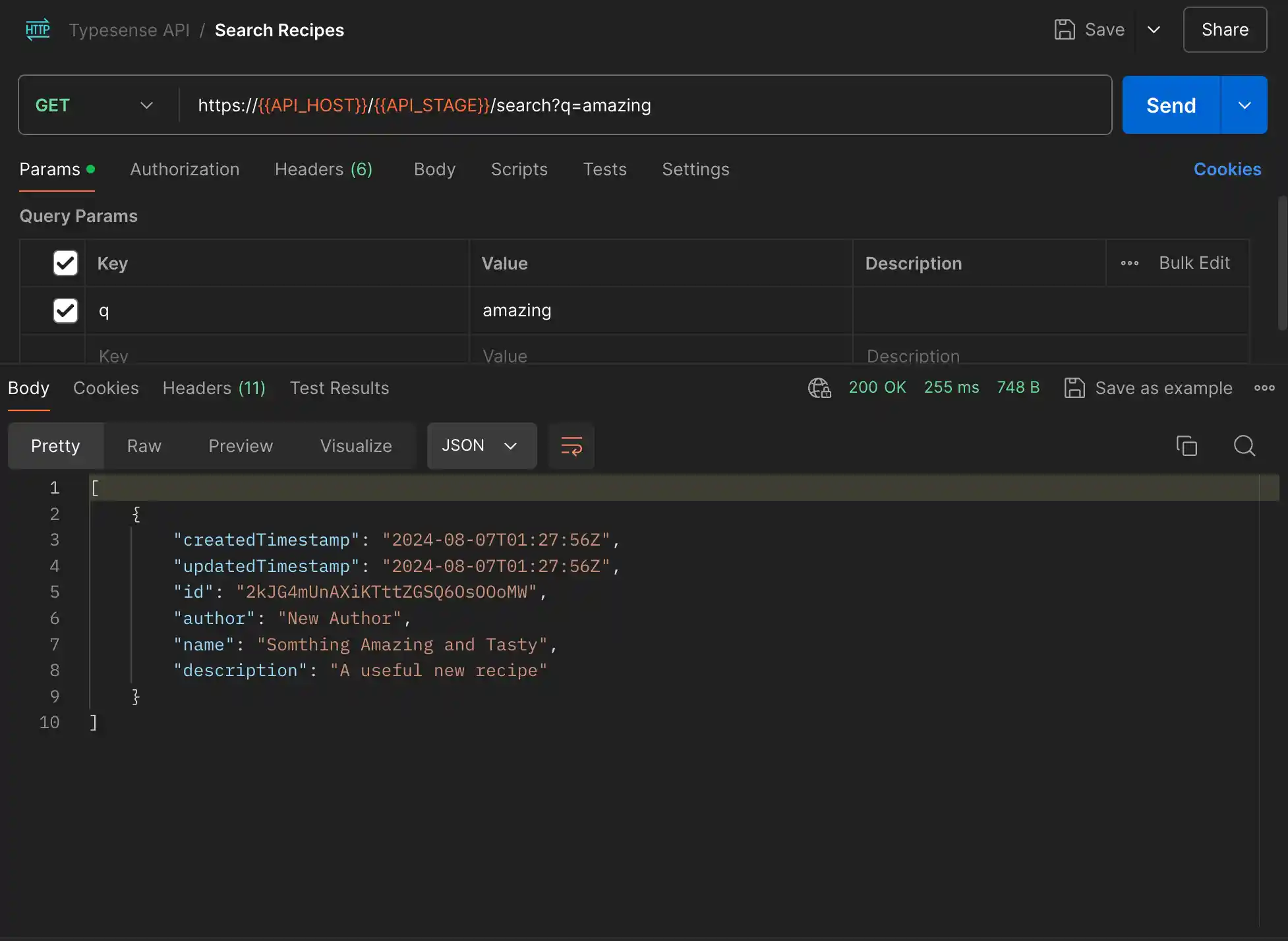
The output of the search operation is an array of Recipes that can be iterated over to display or work with however the client sees fit.
The possibilities of where this pattern can go are endless. It’ll handle so many requirements well that your product team will be delighted with what can be done with these technologies!
Wrapping Up
I’m such a huge fan of Lambda Functions and Serverless but what I probably enjoy most is that I can extend those both services with purpose-built ones like Typesense. Adding search to my API can be difficult with DynamoDB and the native AWS OpenSearch doesn’t come with a nice clean SDK like Typesense does. I find that to be a big boost and feather in Typesense’s cap if I was doing a comparison. Developer experience is something that cannot be understated.
I would however like to see an option to pay per consumption vs paying at the infrastructure level. Having one more layer of abstraction would be nice from a builder’s standpoint. However, where things are today, I’d have no hesitations about including this in a production build. And it would be hard for me to not recommend it over working with another search provider including the AWS native ones.
So to summarize. If the search is a requirement and you are using Serverless technologies, Typesense would be a natural fit in your architecture. And with a language like Golang that is small, easy to code in, has an amazing developer experience, and performs super well with Serverless, this really could be a powerful combination.
Thanks for reading and happy building!